Firewall
The Firewall allows you to view, add, edit, enable, disable, or delete Windows Firewall rules managed by NETworkManager. Rules are identified by a NETworkManager_ prefix in their display name so that only rules created through NETworkManager are shown in this view. Enable Show all rules in the settings to show all Windows Firewall rules.
Windows Firewall (Windows Defender Firewall) is a built-in host-based firewall included with all versions of Windows. It filters inbound and outbound network traffic based on rules that define the protocol, port, address, program, and action (allow or block).
Without administrator privileges, the view is read-only. Use the Restart as administrator button to relaunch the application with elevated rights.
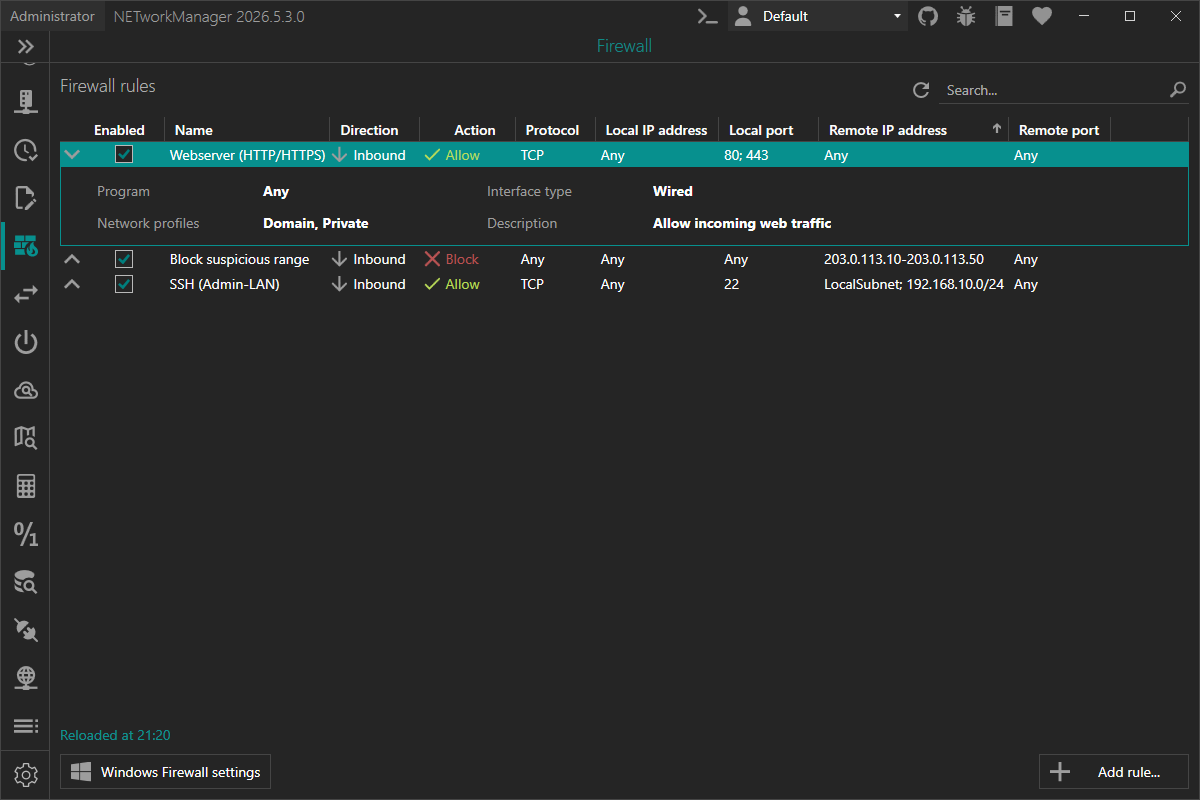
The Program column shows the file name of the program the rule applies to (e.g. putty.exe). The full path (e.g. %ProgramFiles%\PuTTY\putty.exe) is shown as tooltip and in the row details.
Click the chevron in front of a rule to show its details: program (full path), interface type, network profiles, description, source (Local, Group Policy, Mobile Device Management (MDM) or Windows (runtime)) and, if set, the unsupported properties the rule uses (e.g. ICMP types or a service).
The selected rule stays selected (and is scrolled into view) when the list is reloaded, e.g. after it was enabled, disabled or edited. If several rules were selected, only one of them stays selected.
The search above the list finds rules by name, program, direction, action, protocol, local / remote addresses, local / remote ports and description. The list is filtered after a short delay while typing.
Toolbar
| Button | Description |
|---|---|
| Add rule... | Opens a dialog to create a new firewall rule |
| Windows Firewall Settings | Opens the Windows Firewall management console (WF.msc) |
Rules not managed by NETworkManager
By default, only rules managed by NETworkManager (display name prefixed with NETworkManager_) are shown. If Show all rules is enabled in the settings, all active Windows Firewall rules are shown (e.g. Windows built-in rules, rules created by other applications or from Group Policy).
When all rules are shown, an additional column shows where a rule comes from. Click the column header to sort by it (managed by NETworkManager, not managed by NETworkManager, then managed by a policy).
| Icon | Description |
|---|---|
| Shield | Managed by NETworkManager. All actions are available. |
| Crossed-out shield | Not managed by NETworkManager (e.g. Windows built-in rule or created by another application). The rule can be enabled, disabled, deleted or copied, but not edited. |
| Shield with lock | Managed by a policy (Group Policy or Mobile Device Management (MDM), e.g. Microsoft Intune) or created by Windows at runtime (e.g. dynamic or hardcoded rules). The rule can't be changed locally, it can only be copied. |
If at least one of the selected rules is managed by a policy, Enable, Disable and Delete are disabled for the whole selection.
Rules not managed by NETworkManager can be enabled, disabled, deleted (also together with other selected rules) or used as a template via Copy as... (the copy is created as a new rule managed by NETworkManager), but editing them is not supported (yet). These rules may use properties that can't be shown in the edit dialog (e.g. rule group, service, ICMP types, edge traversal or app packages). The Edit action is disabled for these rules.
Some rules (mostly Windows built-in rules) use values that are not supported by NETworkManager, such as port keywords (e.g. RPC, RPCEPMap, IPHTTPSIn), a combination of interface types (e.g. Wired, Wireless), a protocol that is not listed in the dialog (e.g. IGMP or IPv6) or the program System. These values are shown as they are, but such rules can neither be edited nor used for Copy as..., because the dialog can't show or keep these values and the new rule could apply to more traffic (e.g. to all ports). This also applies to rules managed by NETworkManager that were changed outside of NETworkManager (e.g. in the Windows Firewall management console).
When enabling, disabling or deleting rules and at least one of the selected rules is not managed by NETworkManager, a warning listing these rules is shown, which must be confirmed (for delete, the warning is added to the existing confirmation).
When using Copy as... on a rule that uses properties which are not supported by NETworkManager but restrict the traffic (ICMP types, a service, an app package, specific network adapters, or users / required authentication, e.g. set in the Windows Firewall management console), a warning listing these properties is shown first, which must be confirmed. These properties are not copied, so the new rule may apply to more traffic than the original rule (e.g. to all services of a program instead of a single one). Review the new rule carefully before saving it. When editing a rule, these properties are kept.
Be careful when disabling or deleting Windows built-in rules or rules created by other applications, as this may break network functionality of Windows or the application.
Context menu
Multiple rules can be selected (Ctrl / Shift + click) to enable, disable or delete them at once.
| Action | Description |
|---|---|
| Enable | Enables the selected rule or rules |
| Disable | Disables the selected rule or rules |
| Edit | Opens the edit dialog for the selected rule (single rule only, only rules managed by NETworkManager without unsupported values) |
| Copy as | Opens the dialog pre-filled with the selected rule to create a new rule based on it (single rule only, not for rules with unsupported values) |
| Delete | Removes the selected rule or rules (after confirmation) |
| Copy | Copies the rule information to the clipboard (single rule only) |
| Export | Exports the selected rules (or all rules) to a file (CSV, XML or JSON, incl. whether the rule is managed by NETworkManager and its source) |
Keyboard shortcuts
| Key | Action |
|---|---|
F5 | Refresh |
F2 / Double-click | Edit selected rule (only if the rule can be edited) |
Del | Delete selected rule or rules |
Before enabling, disabling or deleting, it is checked that all selected rules still exist. If one of them was removed in the meantime (e.g. in the Windows Firewall management console), none of the selected rules is changed and an error is shown. If another error occurs while the rules are changed (e.g. access denied), some of the selected rules may already be changed. The rule list is reloaded after every action (also after an error), so it always shows the current state.
If the rules can't be loaded (e.g. because the Windows Firewall service is not running), an error is shown instead of an empty list. If only some rules or properties can't be loaded, the loaded rules are shown together with a message that the list may be incomplete (details are written to the log file).
Add rule
The Add rule dialog is opened by clicking the Add rule... button below the rule list. The same dialog (with the values pre-filled) is used to edit an existing rule, or to create a new rule based on an existing one via Copy as... in the context menu (the name is suffixed with - Copy, the original rule is not changed).
When editing a rule, only the changed properties are updated. Properties that are not supported by NETworkManager (e.g. rule group, service or ICMP types set in the Windows Firewall management console) are kept. If the protocol is changed, ICMP types are reset to Any, because they are only valid for the ICMP protocol they were set for.
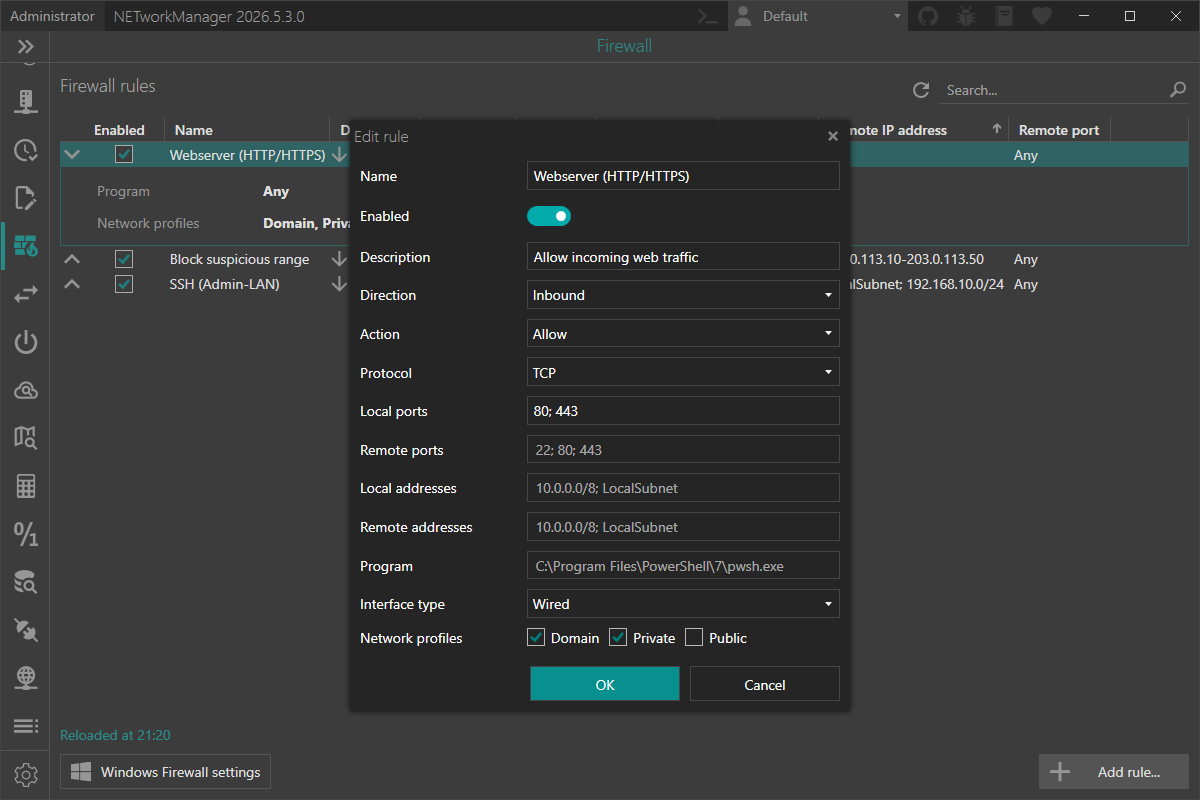
The display name of every rule created with NETworkManager is automatically prefixed with NETworkManager_ so it can be picked up by NETworkManager on the next refresh. The prefix is hidden in the user interface.
Name
Display name of the firewall rule.
Type: String
Default: Empty
Example: Webserver (HTTP/HTTPS)
The name is required and must not be empty. Internally the rule is stored with the prefix NETworkManager_ (e.g. NETworkManager_Webserver (HTTP/HTTPS)).
Enabled
Whether the rule is active right after creation.
Type: Boolean
Default: Enabled
Description
Optional description of the rule.
Type: String
Default: Empty
Example: Allow incoming web traffic
Direction
Traffic direction the rule applies to.
Type: NETworkManager.Models.Firewall.FirewallRuleDirection
Default: Inbound
Possible values:
Inbound(Traffic coming into the local computer.)Outbound(Traffic leaving the local computer.)
Action
Action that is performed when a packet matches the rule.
Type: NETworkManager.Models.Firewall.FirewallRuleAction
Default: Allow
Possible values:
Allow(Permit matching traffic.)Block(Drop matching traffic.)
Protocol
Network protocol the rule applies to.
Type: NETworkManager.Models.Firewall.FirewallProtocol
Default: Any
Possible values:
AnyTCPUDPICMPv4ICMPv6GREL2TP
Local ports and Remote ports are only available when the protocol is set to TCP or UDP.
Local ports
One or more local ports or port ranges the rule applies to. Multiple entries are separated by ;.
Type: String
Default: Empty
Example:
8080; 4438080-809027015-27030; 27036
Only available if Protocol is set to TCP or UDP.
An empty value means Any port.
Remote ports
One or more remote ports or port ranges the rule applies to. Multiple entries are separated by ;.
Type: String
Default: Empty
Example:
5380; 44349152-65535
Only available if Protocol is set to TCP or UDP.
An empty value means Any port.
Local addresses
One or more local addresses the rule applies to. Multiple entries are separated by ;.
Type: String
Default: Empty
Example:
192.168.1.10fe80::1192.168.1.0/2410.0.0.0/255.0.0.0192.168.1.10-192.168.1.50192.168.1.10; 10.0.0.0/8
An empty value means Any address.
The following formats are accepted:
- Single IPv4 / IPv6 address (e.g.
1.2.3.4,fe80::1) - IPv4 / IPv6 subnet by prefix length (e.g.
1.2.3.0/24,fe80::/48) - IPv4 subnet by subnet mask (e.g.
10.0.0.0/255.0.0.0) - IPv4 / IPv6 range (e.g.
1.2.3.4-1.2.3.10,fe80::1-fe80::9) - Keyword:
Any
Other keywords (e.g. LocalSubnet or DNS) are not accepted by Windows for local addresses, they can only be used for Remote addresses.
Remote addresses
One or more remote addresses the rule applies to. Multiple entries are separated by ;.
Type: String
Default: Empty
Example:
8.8.8.810.0.0.0/8203.0.113.10-203.0.113.50DNSInternet; CaptivePortal
An empty value means Any address.
The following formats are accepted:
- Single IPv4 / IPv6 address (e.g.
1.2.3.4,fe80::1) - IPv4 / IPv6 subnet by prefix length (e.g.
1.2.3.0/24,fe80::/48) - IPv4 subnet by subnet mask (e.g.
10.0.0.0/255.0.0.0) - IPv4 / IPv6 range (e.g.
1.2.3.4-1.2.3.10,fe80::1-fe80::9) - Keyword:
Any,LocalSubnet,DNS,DHCP,WINS,DefaultGateway,Internet,Intranet,IntranetRemoteAccess,PlayToDevice,CaptivePortal. Keywords exceptAnycan be restricted to IPv4 or IPv6 by appending4or6(e.g.LocalSubnet4,Intranet6).
Program
Full path to an executable the rule applies to. When set, the rule only matches traffic to or from that program.
Type: String
Default: Empty
Example: C:\Program Files\GameServer\server.exe
If a path is provided, the file must exist on the local computer. Environment variables (e.g. %SystemRoot%\System32\svchost.exe) are supported. Use the button in the text box to select the program.
An empty value means Any program.
Interface type
Network interface type the rule applies to.
Type: NETworkManager.Models.Firewall.FirewallInterfaceType
Default: Any
Possible values:
AnyWiredWirelessRemoteAccess
Network profiles
Network profiles the rule applies to. At least one profile must be selected.
Type: Boolean[] (Domain / Private / Public)
Default: Domain, Private, Public (all enabled)
Possible values:
Domain(Networks at a workplace that are joined to a domain.)Private(Networks at home or work where you trust the people and devices on the network.)Public(Networks in public places such as airports or coffee shops.)
The last enabled profile cannot be unchecked — at least one profile must remain selected.
Settings
Show all rules
Show all active Windows Firewall rules (e.g. Windows built-in rules, rules created by other applications or from Group Policy / MDM) instead of only the rules managed by NETworkManager. The rule list is reloaded when the setting is changed.
See Rules not managed by NETworkManager for what can be done with these rules.
Type: Boolean
Default: Disabled