Traceroute
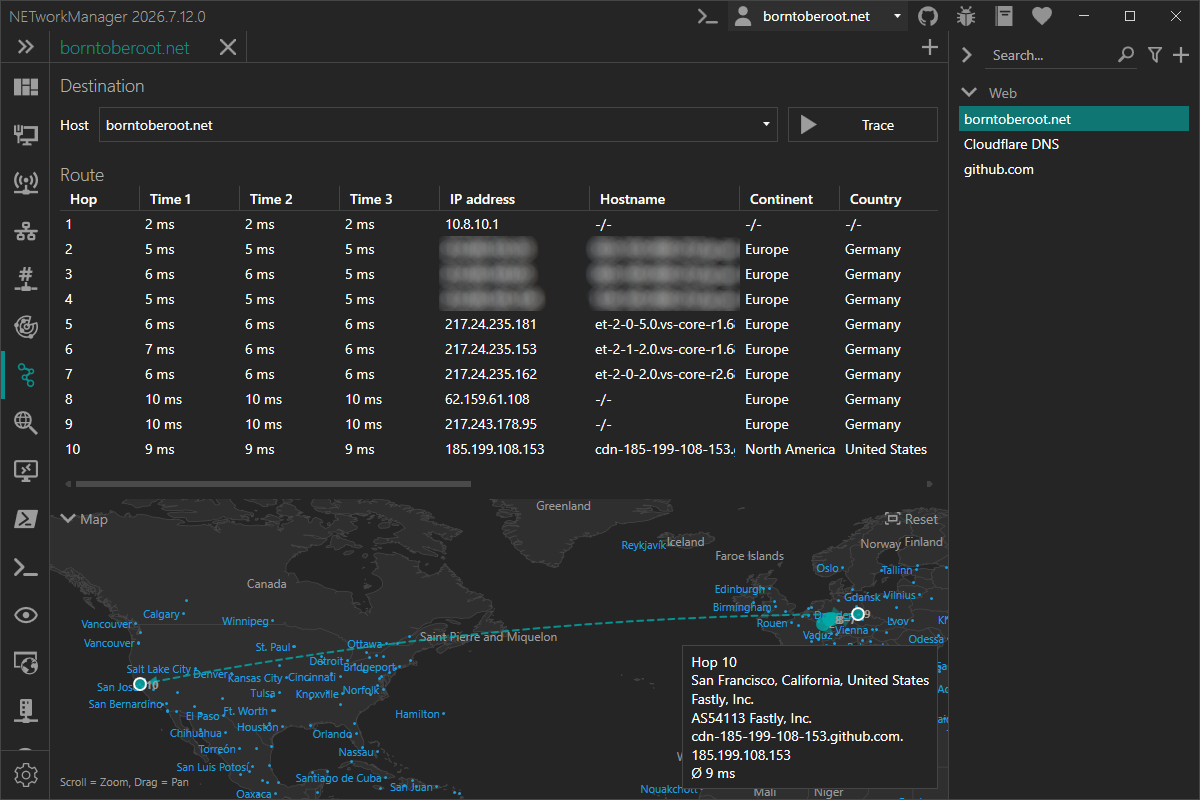
With the Traceroute you can trace the route to a host using ICMP echo requests to determine the network path and each intermediate hop.
Traceroute works by sending ICMP packets with incrementally increasing TTL (Time to Live) values. Each router along the path decrements the TTL by one; when it reaches zero, the router discards the packet and sends back an ICMP "time exceeded" message, revealing its address. This process repeats until the destination is reached.
Example inputs
server-01.borntoberoot.net10.0.0.1
Context menu
| Action | Description |
|---|---|
| Copy | Copies the selected information to the clipboard |
| Export... | Exports the selected or all results to a file |
Map
Below the hop list, a Map visualizes each resolved hop's geolocation on an offline world map. Consecutive hops are connected with curved, directional arrows showing the path the trace took.
The map is only shown if Check IP geolocation and Show map are both enabled — without a resolved geolocation, there is nothing to plot a hop's marker at.
Hover a marker to show its details (location, ISP/ASN, hostname, IP address and average round-trip time) in the bottom-right info panel. Hovering an arrow shows just the source and destination location of that segment.
You can interact with the map:
| Action | Description |
|---|---|
| Mouse wheel | Zoom in and out |
| Left mouse button + drag | Pan the map |
| Reset (top-right) | Resets pan/zoom to fit the current route |
Click the Map toggle in the top-left corner to collapse or expand the map.
Profile
Inherit host from general
Inherit the host from the general settings.
Type: Boolean
Default: Enabled
Host
Hostname or IP address to trace the route to.
Type: String
Default: Empty
Example:
server-01.borntoberoot.net1.1.1.1
Settings
Maximum hops
Maximum number of hops to search for the target.
Type: Integer [Min 1, Max 255]
Default: 30
Timeout (ms)
Timeout in milliseconds for each ICMP packet, after which the packet is considered lost.
Type: Integer [Min 100, Max 15000]
Default: 4000
Buffer
Buffer size of the ICMP packet.
Type: Integer [Min 1, Max 65535]
Default: 32
Resolve hostname
Resolve the hostname of the IP address (PTR lookup) for each hop.
Type: Boolean
Default: Enabled
Check IP geolocation
Enables or disables the resolution of the IP geolocation for each hop via ip-api.com.
The free API endpoint is limited to 45 requests per minute, supports only the http protocol and is available for non-commercial use only.
Type: Boolean
Default: Disabled
Show map
Shows the Map below the hop list.
Only takes effect if Check IP geolocation is also enabled — without it, no hop has a resolved geolocation to plot.
Type: Boolean
Default: Enabled