DNS Lookup
With the DNS Lookup you can query DNS servers for various resource records.
DNS (Domain Name System) is a hierarchical naming system for computers, services, and other resources connected to the internet or a private network. It translates human-readable hostnames into IP addresses and supports various record types such as A (IPv4), AAAA (IPv6), MX (mail), CNAME (alias), NS (name server), and PTR (reverse lookup).
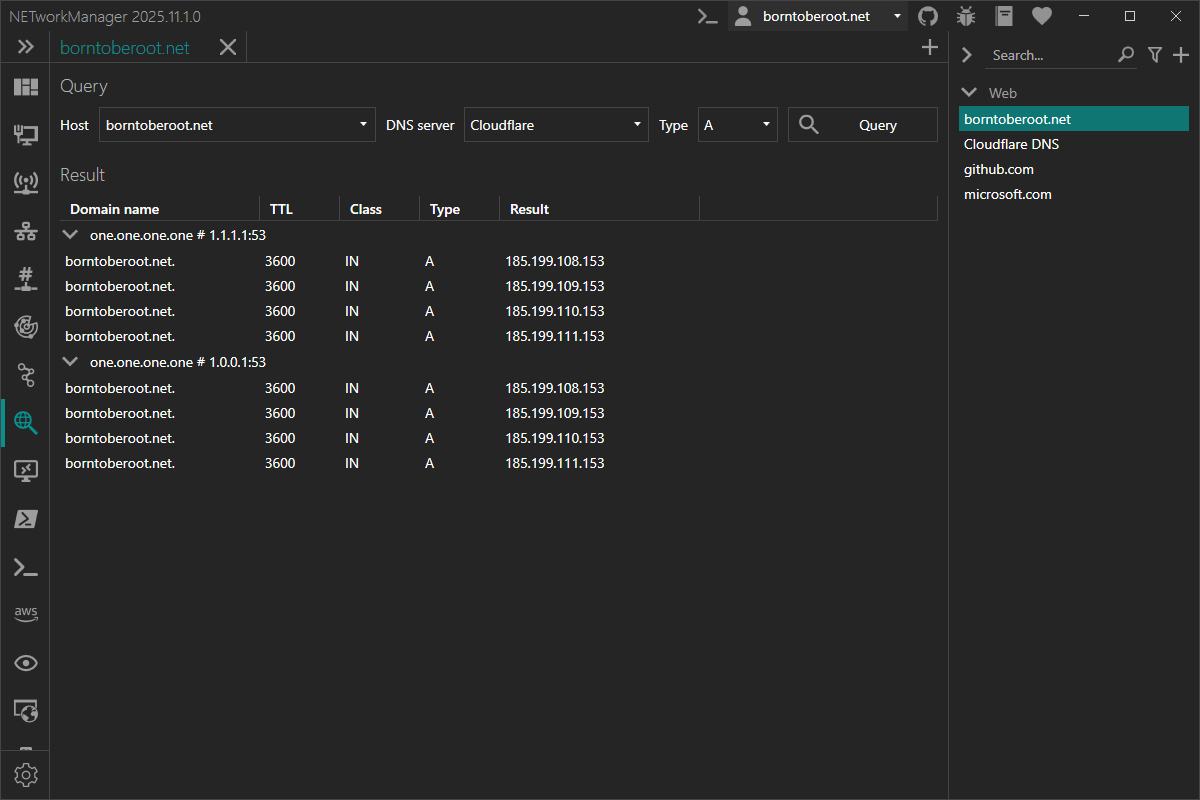
Example inputs
| Host | Type | Description |
|---|---|---|
server-01.borntoberoot.net | A | To get the IPv4 address of the hostname. |
server-01.borntoberoot.net | AAAA | To get the IPv6 address of the hostname. |
server.borntoberoot.net | CNAME | To get the canonical name of the hostname. |
borntoberoot.net | MX | To get the mail exchange servers for the domain. |
borntoberoot.net | NS | To get the name servers for the domain. |
10.0.0.1 | PTR | To get the hostname associated with the IP address (reverse lookup). |
| DNS server | Description |
|---|---|
[Windows DNS] | Uses the DNS server configured in Windows. |
Cloudflare (profile) | Uses Cloudflare's public DNS servers from a predefined profile. |
1.1.1.1:53 (input) | Uses the custom DNS server 1.1.1.1 on port 53 from the input directly. |
ns3.inwx.eu (input) | Uses the custom DNS server ns3.inwx.eu from the input directly. |
Multiple inputs (host, DNS server) can be combined with a semicolon (;).
Example: server-01.borntoberoot.net; 10.0.0.1
The DNS server can be selected from a list of configured servers or you can enter a custom DNS server in the format <hostname>|<ipaddress>:<port> (<port> is optional, to use a custom port with IPv6 enclose the address in square brackets: [<ipv6address>]:53).
Context menu
| Action | Description |
|---|---|
| Copy | Copies the selected information to the clipboard |
| Export... | Exports the selected or all results to a file |
Profile
Inherit host from general
Inherit the host from the general settings.
Type: Boolean
Default: Enabled
Host
Hostname or IP address (or any other resource record) to query.
Type: String
Default: Empty
Example:
server-01.borntoberoot.net(Arecord)1.1.1.1(PTRrecord)
Settings
DNS server
List of DNS server profiles. A profile can contain one or more DNS servers with IP address and port.
Type: List<NETworkManager.Models.Network.DNSServerConnectionInfoProfile>
Default:
| Name | Server 1 | Server 2 |
|---|---|---|
| Cloudflare | 1.1.1.1:53 | 1.0.0.1:53 |
| DNS.Watch | 84.200.69.80:53 | 84.200.70.40:53 |
| Google Public DNS | 8.8.8.8:53 | 8.8.4.4:53 |
| Level3 | 209.244.0.3:53 | 209.244.0.4:53 |
| Quad9 | 9.9.9.9 | 149.112.112.112 |
| Verisign | 64.6.64.6:53 | 64.6.65.6:53 |
Right-click on a selected DNS server to edit or delete it.
You can also use the Hotkeys F2 (edit) or Del (delete) on a selected DNS server.
Add DNS suffix (primary) to hostname
Add the primary DNS suffix to the hostname. If no primary DNS suffix is configured (e.g. the computer is not domain-joined), the connection-specific DNS suffix of the active network adapter is used instead.
Type: Boolean
Default: Enabled
Use custom DNS suffix
Add a custom DNS suffix to the hostname.
Type: Boolean | String
Default: Disabled | Empty
Example: Enabled | borntoberoot.net
Recursion
Use recursion for the DNS query.
Type: Boolean
Default: Enabled
Use cache
Use the cache for the DNS query.
Type: Boolean
Default: Disabled
Query class
DNS class to use for the query.
Type: String
Default: IN
Possible values:
CSCHHSIN
Show only most common query types
Only show the most common query types (A, AAAA, ANY, CNAME, DNSKEY, MX, NS, PTR, SOA, SRV and TXT) in the dropdown menu in the view. Otherwise all available query types are shown.
Type: Boolean
Default: Enabled
Use only TCP
Only use TCP for the DNS query. DNS uses UDP by default.
Type: Boolean
Default: Disabled
Retries
Number of retries for the DNS query after which the query is considered lost.
Type: Integer [Min 1, Max 10]
Default: 3
Timeout (s)
Timeout in seconds for the DNS query, after which the query is considered lost.
Type: Integer [Min 1, Max 15]
Default: 2