RDAP
With RDAP (Registration Data Access Protocol) you can retrieve registration data for domains, nameservers, top-level domains, IP addresses and networks, AS numbers and entities (e.g. organizations or contacts) from the responsible registry.
RDAP is the standardized successor of Whois (RFC 7480, RFC 9082, RFC 9083, RFC 9224). Unlike Whois, it uses HTTPS and returns structured JSON, so the result is shown in a structured view with details, status, events, nameservers, DNSSEC, networks and AS numbers (of an organization), contacts and notices. Links of notices (e.g. terms of service, privacy policy or the form to report inaccurate data) can be opened in the browser. The raw JSON response can be shown and exported as well.
The RDAP server for a query is determined using the bootstrap files published by IANA at data.iana.org/rdap. They are downloaded with the first query, cached locally and refreshed automatically once a week. If data.iana.org cannot be reached, the cached files are used and the update is retried after an hour (at most 3 times, then with the next weekly update). Files that have not been downloaded yet (or can't be read) are downloaded with the next query. See Settings.
- Domains and nameservers are resolved via the registry of their top-level domain. Registries only know registered domains, not their subdomains: for a hostname like
www.borntoberoot.netorwww.bbc.co.uk, the registered domain (borntoberoot.net,bbc.co.uk) is queried. It is determined with the Public Suffix List, which is included in NETworkManager. Some registries (e.g..de,.ch,.li,.io) run an RDAP server that is not (yet) listed by IANA; these are included in NETworkManager. - Top-level domains (e.g.
de) are queried at the IANA root zone RDAP server (rdap.iana.org). - IP addresses and AS numbers are resolved via the Regional Internet Registries (RIRs). Private and reserved ranges (e.g.
10.0.0.0/8,fe80::/10) are queried at ARIN, which returns the IANA reservation. - Entities can only be resolved if their handle ends with a service provider tag registered at IANA (e.g.
ORG-RIEN1-RIPE,-ARIN).
Not every registry offers RDAP. Many country code top-level domains (e.g. .ru, .jp) still only provide Whois. In this case, the domain can be opened in Whois with a single click.
Registration data of personal contacts is usually redacted for privacy reasons (GDPR), the same as with Whois.
The firewall must allow outgoing HTTPS connections (TCP port 443) to data.iana.org and to the RDAP server of the registry. Some registries only offer RDAP via HTTP (TCP port 80).
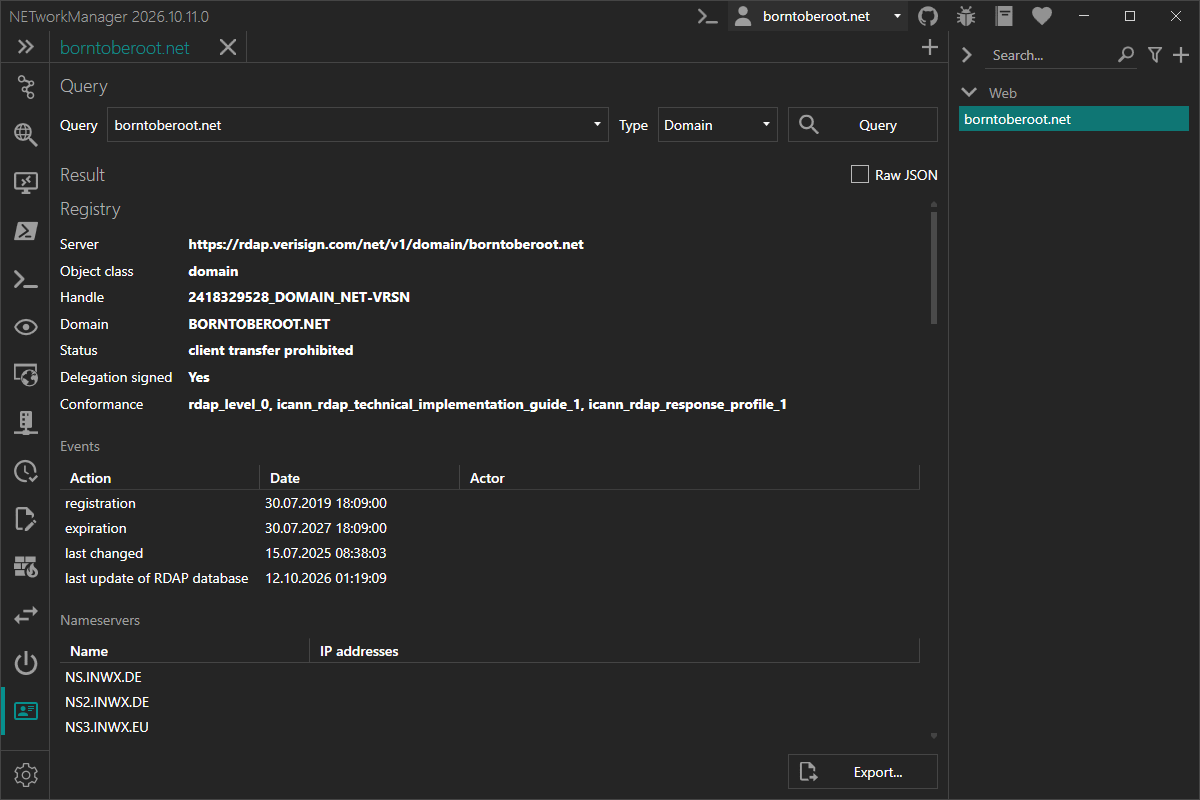
A running query can be canceled with Cancel (or Esc).
The IP address or hostname (if it has a domain, e.g. server01.borntoberoot.net) of a host can also be queried from the context menu of the IP Scanner, and the IP address, hostname or AS number of a hop from the context menu of the Traceroute.
Example inputs
With the type Auto (default), the type is detected from the query: IP address or CIDR, AS number (e.g. AS13335, 13335 or 1.10), top-level domain (a single label, e.g. de), entity handle (a single label with a service provider tag, e.g. ORG-RIEN1-RIPE), otherwise domain. Select a type to override the detection, e.g. to query a nameserver (detected as domain).
| Type | Query | Description |
|---|---|---|
| Domain | borntoberoot.net | Query a domain at the registry of the top-level domain |
| Nameserver | a.iana-servers.net | Query a nameserver at the registry of its top-level domain |
| TLD | de | Query a top-level domain at the IANA root zone |
| IP address | 1.1.1.1 | Query the network that contains the IP address |
| IP address | 2001:db8::/32 | Query the network that contains the CIDR prefix |
| ASN | AS13335 | Query an AS number (13335, AS13335 and asdot like 1.10 work) |
| Entity | ORG-RIEN1-RIPE | Query an entity (organization, contact) by its handle. For an organization, some registries (e.g. RIPE) also return its networks and AS numbers |
Export
The result can be exported via the Export... button below the result or via the context menu (right-click).
| Format | Description |
|---|---|
| JSON | Exports the response exactly as returned by the server. If the referral was followed, both responses as an array. |
| TXT | Exports the structured view as text. |
Context menu
Right-click a row in one of the tables (events, nameservers, DNSSEC, networks, AS numbers, contacts).
| Action | Description |
|---|---|
| Copy | Copies a value of the selected row (e.g. the email of a contact) |
| Export... | Exports the result to a file (see Export) |
Profile
Inherit host from general
Inherit the host from the general settings.
Type: Boolean
Default: Enabled
Query
Domain, top-level domain, IP address, AS number or entity handle to query.
Type: String
Default: Empty
Example: borntoberoot.net
Type
Type of the query. Auto detects the type from the query (see Example inputs).
Type: Auto, Domain, Nameserver, TLD, IP address, ASN, Entity
Default: Auto
Settings
Bootstrap files
Status of the IANA bootstrap files (dns.json, ipv4.json, ipv6.json, asn.json, object-tags.json) that are used to find the RDAP server for a query. Update now checks for new versions immediately. Open location opens the folder where the files are cached.
The files are stored in %LocalAppData%\NETworkManager\RDAP_Cache.
Follow referral to registrar
For many domains (e.g. .com and .net), the registry only returns basic data and refers to the RDAP server of the registrar for details (e.g. the contacts). If enabled, the RDAP server of the registrar is queried as well and both results are shown. Only applies to domain queries.
For security reasons, a referral is only followed if it uses HTTPS and does not point to a local or private address (e.g. 192.168.0.0/16). Otherwise, a message is shown and only the result of the registry is displayed. If a proxy is configured in Windows and the host name of the referral can't be resolved locally (e.g. only the proxy resolves public names), the referral is followed without this check.
Type: Boolean
Default: Enabled
Timeout (ms)
Timeout in milliseconds for each request to an RDAP server, after which the request is considered lost. The IANA bootstrap files are downloaded with a fixed timeout of 30 seconds.
Type: Integer [Min 1000, Max 60000]
Default: 10000